OFFICIAL PURCHASE DIRECTIVE // 100% AUTOMATED QR PH LICENSE FULFILLMENT QR PH INSTANT DIRECTIVE // AUTOMATED FULFILLMENT
OFFICIAL_GUIDE // FAST_CHECKOUT

How to Pay on Zevyr Creative AI
& Get Your License Key

Fast, secure, and automated. Follow these 9 simple steps to pay using GCash, Maya, or any Philippine Bank & E-Wallet with a QR Code Scanner (QR Ph) and immediately receive your Desktop App Installer, Activation License Key, Official Receipt, and Video Tutorials.

INSTANT_KEY

Instant Key Display

Your license key appears directly on screen right after payment.

QR_PH_SCAN

Scan QR Code

Pay with GCash, Maya, MariBank, BDO, BPI, or any PH bank.

PRE_PAID_PASS

One-Time Pass

Strictly pre-paid. Zero recurring billing or auto-renewals.

TUTORIALS

Tutorials Included

Full walkthrough and video masterclass sent to your inbox.

01

Go to Plans & Pricing

PORTAL_NAV

Go to the official website at zevyrcreative.store and click "Plans & Pricing" in the top navigation bar (or click "Acquire License").

  • Direct link: https://zevyrcreative.store/
  • You can also scroll down the homepage directly to the pricing plans.
Make sure you are on the official domain (zevyrcreative.store).
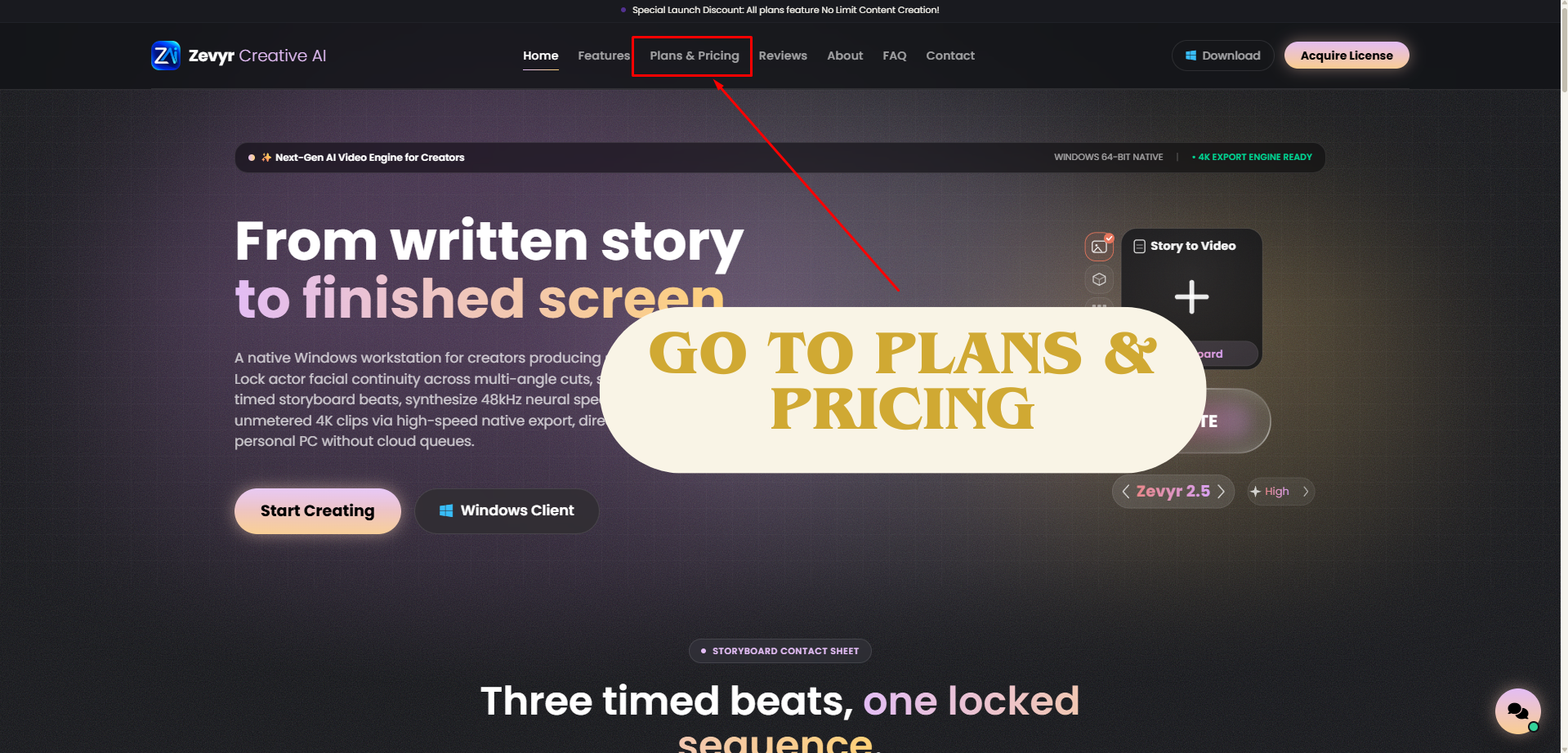
ZEVYR_WORKSTATION // 01_PLANS_AND_PRICING.PNG
02

Add a Promo Code

DISCOUNT_CODE

If you have a discount voucher, enter it into the "ADD A PROMO CODE" box above the pricing table and click "APPLY".

  • Type or paste your promo code into the field.
  • Click the purple "APPLY →" button to apply your discount.
No promo code? Simply skip this step and proceed directly to Step 4.
ZEVYR_WORKSTATION // 02_ADD_PROMO_CODE.PNG
03

Promo Code Already Applied Here

CODE_VERIFIED

Check that the green discount badge appears. All pass prices will automatically update with the discounted rates.

  • Example: 1 Month Pass drops from ₱999 down to only ₱649.
  • The 1 Year Ultimate pass drops from ₱3,299 down to ₱2,144.
Your promo discount is locked in and ready for checkout.
ZEVYR_WORKSTATION // 03_PROMO_CODE_APPLIED.PNG
04

Select a Plan from These Options

TIER_SELECT

Select your desired pass and click the button at the bottom of the card:

  • 1 Month Pass: 30 Days Full Access → Click "Get 1 Month Pass"
  • 2 Month Creator: 60 Days Access → Click "Choose 2 Months"
  • 6 Month Pro Studio: 180 Days Access → Click "Unlock 6 Months"
  • 1 Year Ultimate: 365 Days Access → Click "Get 1 Year Unlimited"
Clicking your plan button will instantly open the checkout details form.
ZEVYR_WORKSTATION // 04_PLAN_OPTIONS.PNG
05

Fill in Your Billing Details and Click Continue

CHECKOUT_DETAILS

Enter your contact information on the checkout form:

  • Full Name *: Enter your name (e.g. Juan Dela Cruz).
  • Email Address *: Your active email — your license key and receipt are sent here!
  • Check the Cloudflare verification box (shows green "Success!").
  • Click the purple button: "CONTINUE TO SECURE PAYMENT".
Double-check your email spelling so your license key arrives immediately without delay.
ZEVYR_WORKSTATION // 05_BILLING_FORM.PNG
06

Scan This QR Code Using GCash, Maya, or Any PH Bank & E-Wallet to Pay

QR_PH_PAYMENT

The live QR Ph checkout window will pop up on your screen:

  • Open GCash, Maya, or any Philippine Bank & E-Wallet with a QR Code Scanner (MariBank, GoTyme, BDO, BPI, UnionBank, etc.).
  • Tap "Scan QR" or "QR Pay" in your payment app.
  • Desktop Users: Point your phone camera directly at the live QR code on screen.
  • Mobile Users: Download or screenshot the live QR code, open GCash, Maya, or your banking app, and upload the QR code image from your photo gallery.
  • Verify Recipient Name: Make sure the recipient name displayed in your app is Zevyr Creative before paying.
ZEVYR_WORKSTATION // 06_PAYMONGO_QRPH.PNG
IMPORTANT: DO NOT scan the QR code in this tutorial screenshot! You must scan the unique, live QR code that generates on your own screen during checkout.
Keep your browser tab open while completing payment on your phone so it can automatically redirect you to your license key.
07

Once Payment is Done, This Screen Will Automatically Appear

AUTO_CONFIRMED

Within 5 to 15 seconds after sending payment, the system automatically detects it:

  • You will see the confirmation screen: "Payment confirmed! Redirecting to your license..."
  • 100% automated — no need to message customer support or send manual payment receipts.
Sit back and let the screen automatically route you to your license details.
ZEVYR_WORKSTATION // 07_CONFIRMATION.PNG
08

Click View License & Downloads

KEY_DISPATCH

Your fulfillment screen displays your ACTIVATION KEY and download links immediately:

  • Click "COPY" beside your Activation Key (ZEVYR-XXXX-XXXX...).
  • Click the purple button: "VIEW LICENSE & DOWNLOADS".
  • This opens the desktop app download portal for Windows 64-bit.
If your browser blocked the automatic popup tab, simply click "VIEW LICENSE & DOWNLOADS" manually.
ZEVYR_WORKSTATION // 08_KEY_AND_DOWNLOADS.PNG
09

Your License Key and Receipt Will Arrive in Your Email Inbox Like This

INBOX_DELIVERY

Check your email inbox for your complete Zevyr Creative AI fulfillment package:

  • License Key / Activation Key: Your activation key to unlock the Zevyr Desktop App for your purchased pass duration (1 Month, 2 Months, 6 Months, or 1 Year).
  • Download Link: Official installer download link for the Windows 64-bit Desktop App.
  • Official Order Receipt: Your complete proof of purchase and transaction reference.
  • Video Tutorials:
  • "How to use Zevyr" — Complete software walkthrough & feature onboarding
  • "Zevyr Content Creation Mastery" — Faceless video production & storytelling
All items arrive automatically: License Key, Download Link, Tutorial Videos, and Official Receipt.
ZEVYR_WORKSTATION // 09_EMAIL_INBOX.PNG

What You Receive After Payment

Everything delivered instantly and automatically to your screen and inbox.

ACTIVATION_CODE

Activation License Key

Unique license code to unlock all features on the Zevyr Desktop App for your purchased pass duration.

WINDOWS_CLIENT

Windows Desktop App

Native 64-bit Windows client with high-speed local rendering engine.

VIDEO_TRAINING

Video Tutorials

Full walkthrough and mastery lessons for storytelling and faceless channels.

ORDER_RECORD

Official Order Receipt

Your official Zevyr receipt and reference code sent directly to your email inbox.

Supported Local Philippine Payment Channels (QR Ph)
GCash Maya ShopeePay MariBank GoTyme Bank BDO Unibank BPI Online UnionBank Metrobank RCBC Pulz Landbank Security Bank

Frequently Asked Questions

Quick answers regarding checkout, fulfillment, and downloads.

Instant and automated. As soon as you scan and confirm payment, your Activation Key appears on screen within 5 to 15 seconds, and a copy is dispatched to your email.

Simply click the purple "VIEW LICENSE & DOWNLOADS" button on the confirmation screen, or open the link sent to your email.

None. All passes on Zevyr Creative AI are strictly one-time pre-paid passes. Zero auto-renewals, recurring subscriptions, or surprise deductions.

Check your Spam, Junk, or Promotions folder. Also, you can immediately copy your key from the confirmation screen (Step 8) before leaving.

The download link is located on the "VIEW LICENSE & DOWNLOADS" page right after checkout and is also linked inside your confirmation email.

Yes. Your email includes video tutorial links: "How to use Zevyr" and "Zevyr Content Creation Mastery".

Ready to Get Started?

Visit the official Zevyr Creative AI store now, select your pass, and activate your license key in minutes.